A browser-native classic Visual Basic VB6 IDE
wieslawsoltes.github.io390 points by wiso a day ago
390 points by wiso a day ago
    Makes it that much more absurd that tooling on modern
    platforms isn't anywhere near this level of discoverability
    and developer-friendliness.
I'm not sure if that's the right term, but by discoverability I basically mean having things like pallettes, property editors, visual builders, codegen... Basically that I can look at the pallete of widgets, drag a button onto the screen, click on it, see and rich-edit all the possible properties about the button, one-click codegen an event handler for any possible event of the button... No documentation, no guessing the names of properties of events, everything is just there right in front of me. I miss that from VB.
VB6 sure looks nice, but I promise it was a hostile mess for anything besides simple GUI apps.
Also, trust me, the VB6 interface hits a lot different (which is to say: worse) on a cramped 800x600 or 1024x1768 monitor than whatever spacious thing you're probably viewing it on. =)
Makes it that much more absurd that tooling on modern
platforms isn't anywhere near this level of discoverability
and developer-friendliness.
1. The VB6 UI element palettes work well because there's essentially a 1:1 correlation between the icon and the thing it produces when you drop it onto the canvas. That works well for visual elements but less well for things that don't have visual analogs.
2. Toolbars/palettes don't scale well past a few dozen items, whereas a VSCode-style command palette or text command autocomplete can scale nearly infinitely.
3. The way HTML works is a totally different paradigm than VB6's fixed grids. Obviously (as this demo shows) you can do that in HTML, as long as you're willing to ship stuff that kind of works like a VB6 app.
You'd be surprised how little you need from a basic desktop application, and how much of that is provided by Visual Basic out of the box.
Also, have you used VB before? having Timer icons all over your form while not being visible at runtime is fairly par for the course.
Also it was fun to have the "invisible" timers placed near the control they worked with. Timer that updates the listbox with serial ports? It's over by the listbox and where is the code for that timer? it's in the timer, double click it!
VB6 the language was a hostile mess. The form builder approach was also in Delphi, and it was equally great there while having a far better language behind it.
Form builders don’t work for responsive design. That’s it, that’s the entire reason they got dropped by industry.
Few people were running 800x600 by the time VB6 came out. I doubt many people were even using 1024x768.
Back then I was running 1280x1024 on a 17" CRT. Which was still modest for the era.
I'd consider VB6 and Delphi peak IDE for the era. With Turbo Vision for the 80s.
Drag-and-drop visual design is the best possible approach until you add the constraint that the window has to be resizable. Then it turns into endlessly messing with the anchoring and resizing settings for each individual widget, and whenever you add/remove a widget or change the form layout you have to mess with everything again. The best experience I've had with UI development is on Palm OS, simply because all devices have the same 160x160 logical resolution and all software runs in fullscreen. You never have to worry about resizing anything so drag-and-drop design with everything just placed on absolute coordinates becomes feasible.
Being able to drag a control onto the form and then double click it to get to the event code is just magical. I remember very well clicking around and building things for several hours before reaching for a docs back in the day.
> by discoverability I basically mean having things like ...
intuitiveness?
Uhm, have you tried Visual Studio with C#? It's the direct descendant of this.
Winforms is a little dated, but much, much closer IMO to VB6. Xaml makes prettier UIs, but it's a bastardized hybrid of drag-and-drop and html.
When it came to Blazor, MS just gave up on drag-and-drop UIs.
Looks good functionality wise, you can even "compile" an app to a HTML file. This is exactly how something like this should work :-).
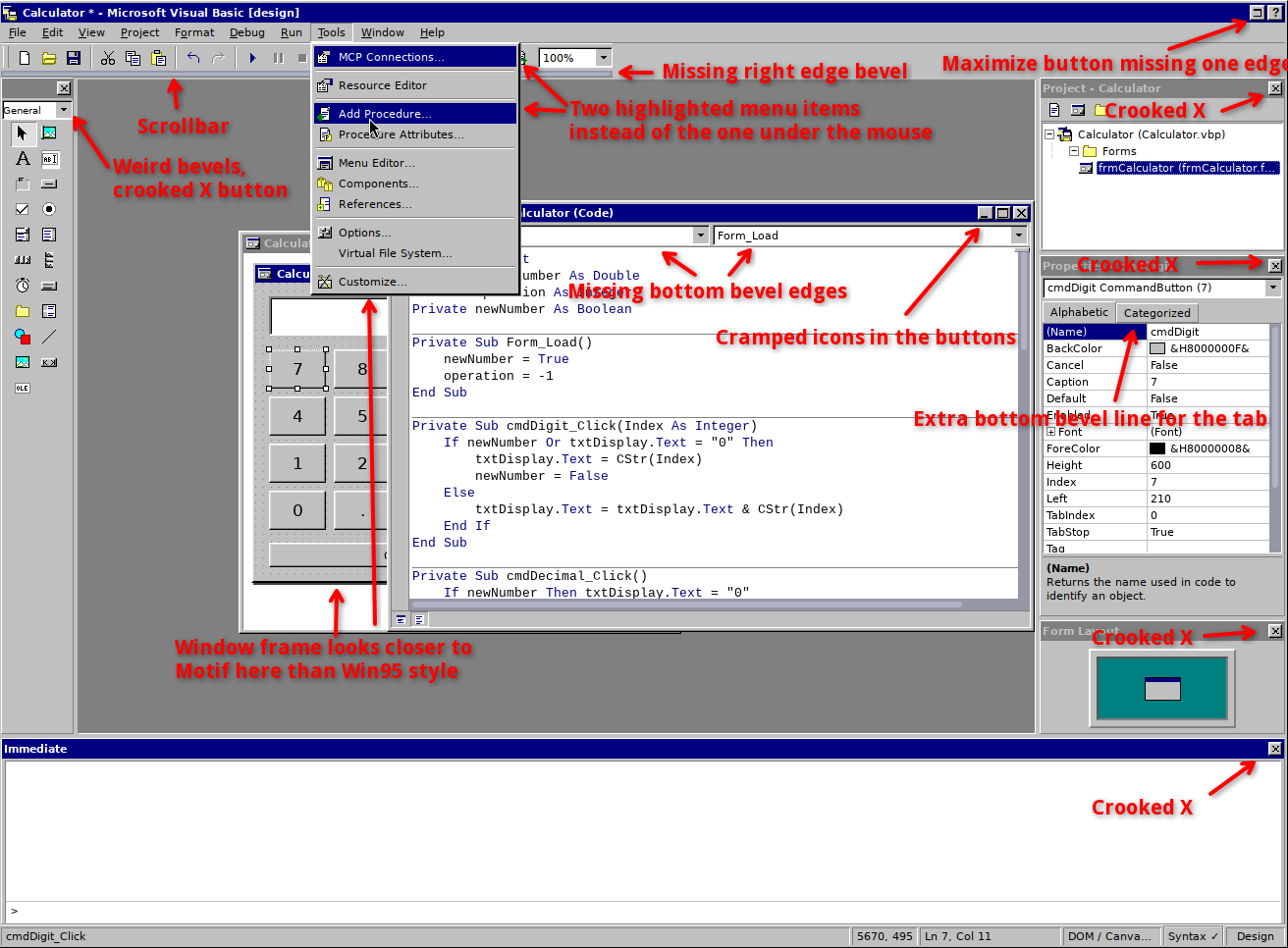
However, appearance-wise it looks very noisy/distorted with some crooked elements (especially window buttons) and missing visual parts (mainly bevel edges). I made a screenshot with comments for it[0].
I guess this was made with AI which isn't that great at making stuff pixel-level unless you explicitly told it to check reference images and be pixel level precise, so i'd recommend firing up a VM with WinXP in classic theme mode (or even better, 86Box running Windows 95 or Windows 98) and grabbing a bunch of screenshots.
Also i found some bugs:
1. You cannot click on non-visual controls (or disabled controls) to select them (e.g. timer). You can still use the rect selection to select them and drag them around by resizing via the handles but clicking on them selects the form.
2. Adding a control doesn't update the controls list in the editor unless you double click a control without a handler (i.e. the form, as long as you remove the Form_Load handler). Even after the controls are updated, if the event list has only one event, you cannot have the editor add by selecting it (i guess because it is already the selected item and you don't receive an event about selecting it).
I tried to make a simple pong game but it seems no key or mouse motion events are implemented yet so all i did was to make a bouncing OptionButton :-P.
[0] http://runtimeterror.com/pages/iv/images/5ffbf1494821c77a3fe...
> I guess this was made with AI
I'm working on my own with AI (separate from this one - unrelated), its a slow burn, but I want to make a source-compatible compiler. So far I can open up forms, and source code (its all IDE specific) but until I build up the actual compiler / debugger, its all cute but nowhere near where it could be. Whenever I have something worthwhile I will put it up on GitHub more than likely.
I've been using screenshots, but I also did find an old laptop I still had a licensed copy on (in my college years I had access to DreamSpark and MSDN).
> source-compatible compiler
What happens when an app calls into a lower-level Windows API? (It's been years, so I don't remember the name for the tech.)
Its fun project and has many bugs still , its major work to make this fully work as one would expect, but keep checking I am putting many new features and fixes now. Thanks for feedback.
> appearance-wise it looks very noisy/distorted with some crooked elements (especially window buttons) and missing visual parts (mainly bevel edges).
Nitpicking. Let me reflect - runtimeterror.com has no https which is available for free, so I'm not entering it.
> runtimeterror.com has no https which is available for free, so I'm not entering it
I think your threat model needs some work here. What exactly does https guard against when downloading a jpeg? A intermediary swapping it out for a different jpeg?
Downloading things from an unknown domain over https still carries the risk of the site itself vending you malware...
Perhaps a compromised device on the local network can MiTM a javascript payload that exploits three zero days on HackerThemAll's browser stack, pwning his computer and finally enabling his super advanced, persistent adversaries to get exfiltrate his super important data.
And all that for what, for a VB6 screenshot on a hn comment threat while procrastinating on top secret work ?
Nah, not worth it.
> runtimeterror.com has no https which is available for free, so I'm not entering it.
It is a direct image link, it wont ask your password.
Also, https is not available for free even if some solutions are available without asking money for it. In this case: the site is on a shared host so the only option is the paid one from the host (so it isn't free-as-in-money) while the alternative is having a VPS and installing something like let's encrypt (which is more expensive than the shared host and requires me to play sysadmin for it, so not only it isn't free-as-in-money but also free-as-in-time).
I mirrored the bug report on the author's Github project [0], so if it helps, you can view the screenshot there.
The property grid control is still the greatest general purpose UI of all time. Define your classes with some attributes and it just works. It was all downhill from there with web and mobile.
I always wonder how we have lost so many useful concepts in our tooling and IDEs.
The reason was the coders' mindset who entered the job market after 2000, maybe up to 2010, that the ability to code (to use a programming language) is the ultimate development of homo sapiens. With that solved by AI, we can safely start going back to simple, sane concepts like low-code and no-code, property sheets and drag & drop user interfaces.
Because script kiddies in the early 2000's, only know vi and emacs, and have nostalgia for using computers as many of us did up to the early 1990's.
Because I learned on this, it made learning everything else that much harder. Even today I wish there was something as functional, basic, and intuitive, even though I well.understand the reasons for doing things different ways.
VB6 compressed a lot of the software development loop into one environment: change a property in a control, attach a behaviour and run.
I am wondering if newer avatars of coding agents can bring that back. Two reasons 1) Code generation is getting faster 2) More and more code is becoming a detail that is expected to work
Imagine a RAD where we have a VB6 like experience and can dive into real code (agent-generated) when the abstraction breaks.
MS has been working on similar ideas recently with its PowerFX language:
https://github.com/microsoft/Power-Fx
It's not really on people's radar but it seems very interesting and I think a lot of people that aren't on HN use and interact with it daily through the apps it supports.
Yes, please.
I spent a lot of time cutting my teeth in MS Access, and would've done a whole lot more in VB6 if it didn't become deprecated so quickly. It's like a whole smooth ecosystem I expected to persist and improve just evaporated, all in favor of much more fiddly stuff or much more expensive stuff (or if you're really unlucky, both).
I would like to see a comeback in this area, with modern security features and reduced bottlenecks for scaling.
I remember in Visual Studio putting a breakpoint on a line, running the execution cursor over it step by step and seeing all variable values that are in scope change in real time. Then being able to drag the cursor back to somewhere before the breakpoint, and edit any value to see if stepping through yields better outcomes. Quite powerful and delightful that.
That was part of what was so great about it, the many different ways it provided new developers to learn and get granular feedback as they went along, without encumbering the workflow for more experienced users.
I took it for granted, expected it to always be there-- wish I had something similar to point modern juniors to.
From the same author: C# browser ide inspired by the modern visual studio https://github.com/wieslawsoltes/SharpForge
He has 500+ open source repositories including very advanced stuff like GPU powered gui framework and game engine components ( https://wieslawsoltes.github.io/Home ). It's very impressive and almost hard to believe that a single person could make all of this, even with help of modern ai agents.
Its new era, you can build, experiment and do fun projects at will , takes few hours to get anything into working prototype. Some of projects might fail, be buggy but exploration pace is unmatched and fun level too.
It is the norm for capable developers. You don't need AI slop for it. Linus Torvalds took a week or two off to out-build the version control industry.
Competent developers have, can, and will out-build entire industries in a week.
Why's it hard to believe? AI tools can generate enormous quantities of slop if you have the money to spend.
The real test is if any of it is any good or not.
Best part of VB5 was that when you hit F1, you instantly got help for whatever was under the cursor. VB6 changed it to use some much slower MSDN help system instead.
This was also the best part of QBASIC.
It was just wonderful. I owe so much to that thoughtful feature as a child.
I wish I could meet the person who decided that. You’ve changed my life.
A copy of MSDN documentation was included on one of the DVDs for Visual Studio .NET's first release, so at least around that time offline mode was possible. I think I was reading those docs more than actually programming.
It was the best part of turbo pascal as well. Before IDEs decided to hide information.
For the old coding environment nostalgic out there, I've made one for TurboPascal here: https://aryx.github.io/ocaml-elm-playground/apps/#programmin...
> border-color: var(--vb-light) var(--vb-dark) var(--vb-dark) var(--vb-light);
This creates 45 degree corners on the borders which are an uncanny valley to me [1]. Feel free to lift any CSS you need from https://jdan.github.io/98.css/, it's MIT licensed. I used a box-shadow hack to get the "staircase" look.
> box-shadow: inset -1px -1px #0a0a0a,inset 1px 1px #fff,inset -2px -2px grey,inset 2px 2px #dfdfdf;
[1] https://notes.jordanscales.com/98-css-reflections#when-butto...
Slick! Thanks for bringing back some memories of how i got into programming; by automating math-homework in visual basic.
Wow, this feels almost like the real thing.
Is there something similar for the web now? Easy UI editor but a fully featured language behind with direct database access.
For what it's worth, I'm thinking of some version of this for my upcoming game's modding tools, although the backend processing will be on a web server unlike this demo, and there is much more of an AI agent focus.
This is pretty much exactly https://anvil.works (I'm a founder). The full-featured language is Python (both server and client side). Hit Publish and we'll host it for you (database included), or git-clone it and self-host.
There are a bunch of escape hatches if you want to get to the lower level platform (eg use JS libraries, or express a particular piece of styling in HTML+CSS), but the core experience is very VB-like: drag, drop, edit properties, run code on events.
These kinds of browser recreations of old native apps always fails at text rendering.
What's wrong with it? Sure it's way more higher quality but the layout seems... fine?
Yeah, it’s not 100% correct (some margins are off to my eye) but it’s okay.
Some texts on the other hand scream LLM to me. E.g. this label in the Print Code dialog:
> Opens a browser print window containing source only. Browser and operating-system print settings remain native.
This is just not how humans write. In fact, I don’t think a human would write anything here – it’s an implementation detail, not something that should be user-facing.
Ah I got whooshed, I interpreted text rendering literally. As in shaping, kerning, and aliasing haha
You can even make changes to the code while debugging and stepping line by line through the code. That was one of the best parts of VB6! Albeit a little dangerous.
Childhood resurrected, awesome! 30+ years later, I'm still super fast in it, lol. Thanks!
VB6 was my first "language" back in high school and how I earned money ie. making software for local folks. It was great!
That and Flash is what I miss, we don't have the tools anymore. Lost in hunt for "optimal" or "responsive" apps.
From the title I thought someone managed to emulate VB6 in the browser which would be quite a feat. Turns out it's a retro version of wix and produces html and JavaScript, more or less. Can't say I'm excited.
This is nostalgic. Although I think VB didn't have anti-aliasing back then. However, I remember creating an app with a UI and MS Access to store data with VB and it felt like magic to me.
Well pixel perfect would require different rendering approach. I am adding new WebGPU rendering engine and might add this original look as option too.
Nice job - definitely consider implementing at least a little bit of the Win32 API layer! For kicks I tried importing an old highschool VB6 map editor at it which uses BitBlt but sadly it didn't work.
Good times! My first programming language :)
I remember sitting in class in school, writing out programs on paper for me to try out at home
I already forgot I did that too. Too bad you can't relive parts of your life '_'
3 - 3.01 = -0.009999999999999
That brings me back.
This is still true in JavaScript and many other modern languages.
Well, it's close in JS: 3 - 3.01 = -0.009999999999999787
Super cool! Brings back so many memories. I wrote some very popular apps in VB back in the Windows 9x era: hot corners, screen savers, notes app, and many more.
The speed with which this thing launches in a browser should put shame on the faces of current IDE developers. While VB itself was nothing to write home about there certainly was something lost when hardware became more powerful. Imagine what current and 'recent' hardware were capable of if only efficiency was taken seriously again. Maybe generative AI can provide a boost where human developers would rather spend their time on chasing the latest fads, adding yet another feature or inversely removing even more functionality in an attempt to create the 'perfect' sparse application? Let the humans think up the features and write the initial implementation, then loosen the bots on the code to make it run as efficiently as possible on hardware which used to be current a few generations back.
The power relationship between the computer and the human has shifted since then. We want our computers to run slower so we don’t feel quite so inferior.
I don't. It's a machine, it should be fast and efficient.
Are you sure? A UI based on instant gratification? Seeing everything simply blink into place instantly might not be as fun as you think after the newness wears out.
Anyway, if you really want to, you can emulate old OSs with a very fast modern computer. Some emulators even bridge the network and file system to support enough that you can really live in it.
I would love if everything on a computer were instant. One of the fastest programs I use is Sublime Merge for a Git UI. It opens and does everything so fast, and I love it. Since the first time I opened it, I haven't even opened the previous Git GUI I was using, even though I like both their UIs about the same. I had to buy Sublime Merge, compared to the free app I was using before it.
It's not just me who prefers everything as fast as possible, but true of people in general. Google measured that slowing down loading a search page by only 400ms caused people to do fewer searches. And the biggest reason I heard people say they switched to Chrome was that it was faster than other browsers (which was true for the first couple years after release).
[flagged]
The less work something has to do, the faster it is, and the less things that can go wrong.
Compare a simple light switch circuit vs a "smart" light switch that's slow because your smart hub talks to some AWS service. Or a native app vs an electron monstrosity that takes 10 seconds to load.
Yes, I want my tools to be fast, not only for speed's sake, but because speed is a sign of simplicity and reliability.
> Are you sure? A UI based on instant gratification? Seeing everything simply blink into place instantly might not be as fun as you think after the newness wears out.
laughs in Amiga
Awesome! If only we could publish the programs as a PWA :)
Thoughts on tools capable of that?
- Xojo is a commercial tool which I believe does that (but with a price and license to match)
- MoonBasic seems like a promising start
- Gambas for folks using Linux?
- For folks using the very affordable PureBasic there is the matching (also commercial, just about as affordable) SpiderBasic
Naturally if one extends the search to other languages there are lots of options, but Lazarus with a .js Object Pascal compiler seems worth mentioning. For my part, I was swayed when flet.dev announced their v1.0 and so went the Python route....
You can export apps as single page html, more original exports are on the works but it more complex.
FWIW, the File menu has a command to export the program as a self-contained HTML file.
VB6 was peak programming and the nostalgia levels are insane.
Oooh beautiful! Visual Foxpro was the same, only the language changed but their screen designers were almost identical
And the Visual Studio, obviously :-)
Also MS Access form designer was quite like that; I kinda miss it.
This really takes me back - not that far, alas, as my Scottish high school was teaching VB6 in 2016!
Debugging and IntelliSense don't work, and the deliverable isn't a .exe but an .html (though it works). Wondering if it can access ODBC lol.
I reckon you might be asking for a little too much from a single web dev there.
That's great! I used to love creating UI with VB6 when I was a teenager in high school.
Was this built with Uno Platform too?
Looks great! However using an active trademark from a mega corp seems like risky move even for a fun project.
I promise I will not hack the project when OLE controls become available.
This takes me back! Right clicking works too, this is awesome. I miss property tables, that was a nice UX. Flash had it too.
I wrote my first programming language compiler on VB6. Yes, a strange thing to create a programming language. VB6 has a special place in my heart.
easy way to trigger an Epic developer
Wait Epic as in the medical software is written in VB6‽
The GUI parts are or were.
And parts of their patient portal website were still VB6 on the backend a decade ago, not sure that's true anymore. Visual Basic 6 as a web backend.
VB was the backend language for the vast majority of original Active Server Pages sites.
My memory may fail me, but I'm pretty sure ASP used VBScript, not regular VB. Similar syntax but not the same runtime/environment. ASP could use any Active Scripting language (the other language shipped with Windows being JScript, MS's impl of a subset of JS)
Frequently VB if your application had COM components in Microsoft Transaction Server. I shudder at the memories. But yes, the <% ... %> inclusions in the .asp files were actually VBScript (usually) not full VB.
You're correct. I did a ton of ASP in JScript back in the day, but VBScript was much more common.
Here's something that will bake your noodle. Sage 100, the accounting/ERP software, is still to my knowledge written in Business BASIC from the 1970s—specifically the variant that ran on MAI Basic Four minicomputers (just 64 KiB of RAM!). This variant of BASIC was so, as Claude says, load-bearing that several companies emerged to support source-compatible versions on a variety of platforms as the non-mainframe business world evolved from custom-schmustom minicomputers to Unix workstations and PCs. The most common variants today are BASIS International's BBx and BBj (Java), and ProvideX. Sage 100, originally MAS 90 and MAS 200, was an accounting solution originally developed for those 1970s minicomputers and then forward-ported to new platforms as the business landscape evolved.
I dealt with ProvideX code for a Customer who was using an industry-specific customized version of MAS 90. I managed to see some of the source (under NDA) of the customizations and it was fucking horrifying-- line numbers and GOTOs and global variables. It makes my eyes burn a little thinking about it...
One feature that Business BASIC did have even way back in 1975 that I really appreciate is some form of exception handling: just about every I/O operation had, as a required argument, at least one line number to jump to in case of failure. Some required several, for different types of failures (file not found, I/O error, etc.).
That code you looked at must have been incredibly old! I think that BBj and ProvideX both added structured-programming features to make working in their environments at least somewhat tolerable. As intolerable as we find it today, Business BASIC was really a breath of fresh air in its time compared to the alternatives, like COBOL...
I dug up to code to make sure I was remembering properly and, oh boy, I was! There's a header on the file that indicates a revision date of 2011. I wonder if the coding style isn't based on style-guidelines at the MAS 90 customization company. I'm betting they have code going back decades, and keeping a consistent style is probably a win (even if the style is eye-gougingly bad to read). I do see they've adopted a mix of numeric line numbers and alphanumeric labels.
I'm used to "ON ERR GOTO"-type error handling in BASIC dialects, whereas in this code I'm seeing a lot of defensive "IF ERR=xxx" after API calls. It looks like they're also "cleverly" using the division by zero handler as an "escape hatch" out of a subroutine. To paraphrase some their code:
> 31338 IF ERR=15 THEN LET ERRMSG$=MSG(-1) ELSE IF ERR=14 THEN GOSUB DB_LOGIN; IF NO_CONNECT THEN LET a=1/0 ELSE GOTO 31337
That's the stuff!
Apparently they didn't make use of line renumbering (or the ProvideX environment doesn't support it) because I see features and error-handling shoehorned in between lines numbered ascending by 10. It reminds me of 9 y/o me shoehorning in new code when I was trying to write text adventure games using a unique INPUT / IF/THEN / GOTO block for each "room" of the game.
For anyone who has had to touch any desktop version of Sage in 2026, this is not at all a surprise.
The example code is bad. It doesn't even have "On Error Resume Next" on the top of the code. How are you supposed to skip all errors? SMH my head.
I miss the old NT4 look. Its was very productive and no slop/nonsense.
I've been using 98.css [0] as a foundation for building many of my personal projects lately -- I think it's pretty great, and a really refreshing return to some older paradigms.
How does it compare with
really cool! brings the memories back.. I used to create few shareware products back then with VB3 - VB6.
Wow, that's great. It brings back so many memories
My first <del>love</del>IDE…
Damn... brings back memories...
Was this done with an LLM? Repo?
Their github account lists over 5,000 commits and 1,500 pull requests... just in the last 4 days.
Yes, if you look at the developer's Twitter account they've shared a large number of projects in the past week, including in-browser recreations of Windows Vista, XP, 2000, ME, 98, 95, 3.1, Mac OS 9, Word, Excel, OneNote, Access, Visio, Adobe Illustrator, Adobe Reader, a Git Client, a CAD program, a video editor, etc. https://x.com/wieslawsoltes
Looking through his work it seems that he has build a whole .net browser based ecosystem [1]. Pretty impressive its own right. However, for his showcase projects I was wondering how he'd prompt to guide these recreations, i.e. what is used as the input, I can't image that he'd describe every tiny detail...
I was wondering how he'd prompt to guide these recreations, i.e. what is used as the input, I can't image that he'd describe every tiny detail...
I thought the same way when I saw some impressive AI-generated videos not long ago, and I suspect the author prompted AI to get a basic idea, and then possibly after many iterations, finished it up with manual editing.
Author of this one shared the exact process https://x.com/anabology/status/2106473469441384788
https://drive.google.com/drive/folders/1aIbRs2f6sVpCxO4TGoBf... (direction-log.md shows all the human provided input). It is far less than you'd think.
Uhoh, that'll bring back 1-based array indices
This is amazing
I had forgotten how cool the lines breaking each methods where in the source code editor!
...Off to waste the day in my .vimrc *sigh*
talk about a blast from the past!
Intellisense?
Was that there?
IIRC even QuickBASIC 4.5 had a form of "IntelliSense" in the form of hints as to the defined data structure, if provided in DECLARE statements. F1 hints are mentioned elsewhere for built-ins but I seem to recall it (or a similar quick action) also working for a smart of "what kind of data are you allowed to pass to this user defined subroutine or function".
So I think you're talking about TYPES.
  TYPE PERSON
    AGE AS INTEGER
    FIRSTNAME AS STRING * 12
  END TYPE

  DIM KURTZ AS PERSON


  PRINT KURTZ._
However you are right that if you hit F1 on KURTZ it would then show User defined PERSON, and then you could hit F1 again and it would show built-in help of user defined TYPE with AGE/FIRSTNAME properties. Sort of like context-sensitive help I guess.
As far as subroutines/functions go, if you tried to pass data into a subroutine where the data couldn’t be coerced, it would just give you a generic type mismatch.
  DIM Y AS SINGLE
  Y = 10.5

  PRINTIT  Y   ' Throws parameter type mismatch
  PRINTIT (Y) ' Succeeds through a self-evaluated expression which is effectively BYVAL because Microsoft takes pain in your suffering.

  SUB PRINTIT (X%)
    PRINT X%
  END SUB
I've spent the last 6 months building a similar 1:1 faithful recreation of QBASIC and QuickBasic 4.5 that runs natively in the browser [1] - so I know way more about this than anyone should by right.
Wow. very nice, it even runs the app
Kind of cool how far the browser as platform progressed.
We look back at people's computers, say, 30 years ago now.
And in 30 years the people will look back at us and wonder why we sucked so much. Or, AI skynet slop is winning, then we all look up to our AI overlords.
[flagged]
[dead]
[dead]
OK, so I followed through to the author's GitHub page and the project's repository and...
no CLAUDE.md, no AGENTS.md, no SKILL.md, no .claude or .agents directories either.
Dare we dream? A project this ambitious, done without AI help? I'm getting that feeling like when I see a piece of really well done art come across my feed—and it was done entirely by a human!
> no CLAUDE.md, no AGENTS.md, no SKILL.md, no .claude or .agents directories either.
Untracked.
Unfortunately I have to point you at some of the other comments here: https://news.ycombinator.com/item?id=49958929