Android's desktop interface leaks
9to5google.com199 points by thunderbong a day ago
199 points by thunderbong a day ago
They ought to put the status bar at the bottom. All the designers using Macs probably forgot, but Chrome's tab interface was designed for Windows where it could be all the way at the top of the screen. And in general it's more common for desktop apps designed for mouse and keyboard to have frequently accessed UI elements at the top of the window than the bottom. So desktop apps would benefit from being able to use that real estate at the very top of the screen.
This is what you lose when you take a team developing a desktop OS and move it under a team doing a mobile OS.
Auto-hide the task bar at the bottom, and you've basically got the Gnome UI. Works just fine. It's the permanent screen reservation of the double task bar that really eats up the usable desk space.
Samsung's task bar (when you enable the DeX integration on a tablet) also supports this and it makes for a fine user experience.
Edit: I've enabled "force desktop mode" on my Pixel 9 Pro and hooked it up to my laptop dock. The UI looks almost exactly the same already. Taskbar at the bottom, notification bar at the top.
It's clearly experimental; my ultrawide screen scales horribly, my keyboard app gets horribly confused, and interacting with the top bar triggers a full-screen tablet overlay that looks a bit weird.
However, Chrome opens multiple windows and browses just fine. There are right-click menus, mouse hover interactions, window resizing features (though some apps require the "force resizable activities" flag). Ethernet Just Works, audio/video just works, and I can operate my phone screen while working in dock mode (so apps that absolutely refuse to work can still be operated through the touch screen).
Hiding the bottom bar doesn't solve the problem because it still takes the corners away. You can't put UI there because the bottom bar will come up and cover it when you mouse into the corner. The OS is taking all four corners for itself. Greedy! Apps should have that space. Apps are what we are here to use and the OS is getting in the way.
Inexplicably, Samsung removed the ability to hide the taskbar with One UI 8 last year.
They rebuilt DeX on Google's desktop codebase. So obviously a lot of features were lost. Hopefully what we'll gain is wider app support.
Elements on the top of the screen have virtually infinite height, and elements in the corners have infinite height and width. You can't aim "too high" for something at the top of the screen.
Status bars on top don't make sense if you have tabs on top. Now your tabs are infinitely smaller, and aiming at them requires a lot more effort.
Mac's original design had the menubar on top, and its windows didn't have tabs, so it all worked fine together. That's not the case for browsers with tabs on top.
Along the way, it seems most designers have forgotten about Fitt's Law: https://en.wikipedia.org/wiki/Fitts's_law#Implications_for_U...
The linked article seems to imply that this remains a good design choice even today:
> The use of this rule can be seen for example in MacOS, which always places the menu bar on the top left edge of the screen instead of the current program's windowframe.
I guess now that the browser is the one app you probably spend the most amount of time in, it might make a little less sense? Android's lack of a menu bar system makes it make very little sense there.
I wonder how relevant Fitt's law is with bigger screens and the drastically changed ratio between mouse hand movement and cursor movement on screen. It used to be that you could reach a screen corner with a very simple flick of the mouse hand wrist. But that doesn't feel the same way anymore on modern hardware.
Agree. They should make the desktop UI similar to what is there on ChromeOS or Samsung Dex. The top bar doesn't make sense at all.
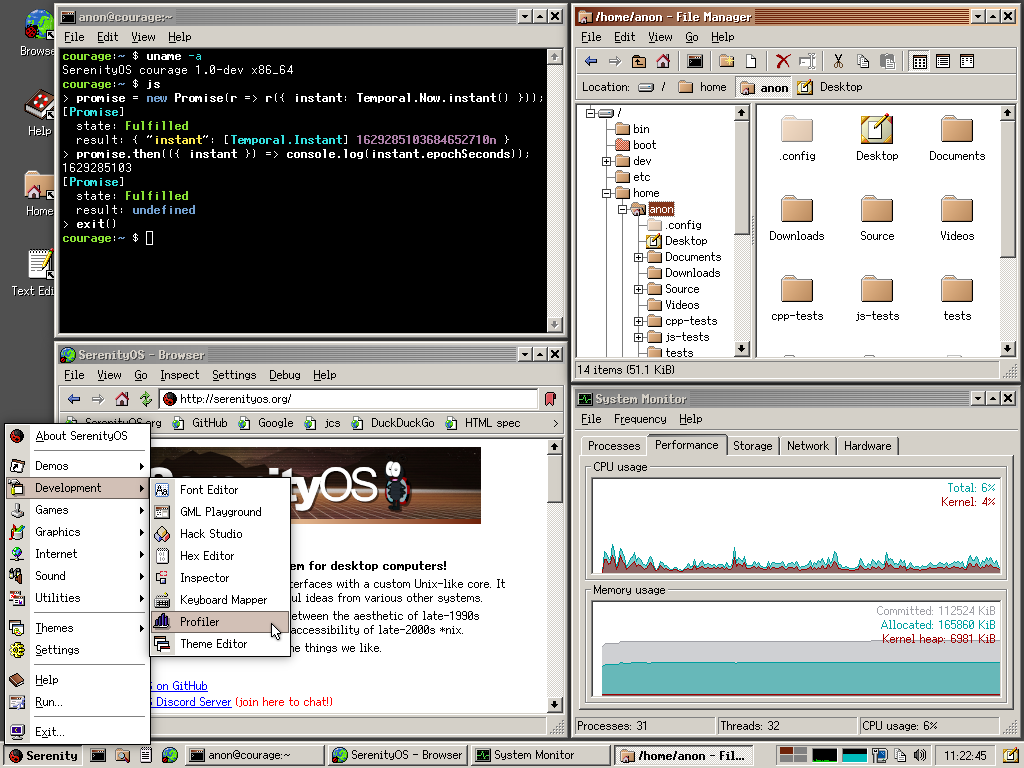
Essentially a clone of Windows 11, and those screenshots make me realise just how much I hate the rounded corners, borderless vagueness, and excess padding of "modern" UI.
For contrast, this UI is more my style: https://serenityos.org/screenshot-b36968c.png
I too love that style, but it won't work today, because many apps today are Electron slop that disregards user preference and styles itself.
This looks like it will help a lot of students and families who are on a budget. If you can just plug your phone into a screen you do not need to buy a separate laptop anymore. The browser extensions are the most important part because that is what makes a computer useful. I am glad to see they are thinking about this.
>This looks like it will help a lot of students and families who are on a budget. If you can just plug your phone into a screen you do not need to buy a separate laptop anymore.
Except that android phones with display output are mostly flagships with flagship prices.
But 50 Euros on the used market got me a retired corporate HP/Dell laptop with 1080p screen, intel 8th gen i5 quad core, 8GB RAM and 256GB NVME on which I put Linux. Way better for studying and productivity than my android phone hooked up to the TV.
It's a nice feature to have as a backup in case my laptop dies, but I wouldn't daily drive an android phone as a desktop computer for productivity.
Resell the 8GB of RAM and buy an even better phone then? That's 150 euros of value right there.
Then use the money on a reputable second hand store to buy a used S20 5G 128GB for 150 euros, or a S22 128GB for 145, maybe an S21 Ultra 5G 256GB for 139, and you've got yourself a valiant workstation already (Samsung DeX works great out of the box, no need to wait for Google here). I can also find an S20+ 5G 128GB for 75 euros with display damage (but that doesn't matter when you hook it up to a monitor).
On another website I can find an S20+ 5G with cracks in the edges of the touch screen for 50 euros. That's 12GiB of RAM, 128GiB of storage, a 3200x1440p@120Hz screen and 5G connectivity built in. You're gonna need a Bluetooth mouse and keyboard (that's like what, 5 euros?) to hook it up to the TV but then you're good.
Where is the $150 euros coming from? 8GB of brand new DDR3 or DDR4 is available for $20-$30 from Amazon / Fleabay, and once he sells it the laptop will no longer work.
Why buy a used phone that will stop receiving updates, can't be fixed or upgraded and can't run whatever you want on it when you can use a real computer instead?
Actually many ridiculously expensive "flagship" smartphones do not have DisplayPort and some do not have even USB 3.
The chances to find DisplayPort in what nowadays have become medium-price smartphones, i.e. $500 to $600, are about as good as finding DisplayPort in a "flagship".
The moto g100 is a good example of a midrange phone with decent specs, including video output. It launched at $400, and can be bought for around $200 these days.
It has a Snapdragon 870, 8gb RAM, 128gb storage, a microSD slot, headphones jack, and a big enough battery to last 2 days. It's a little chunky, and it's not waterproof, but beyond that it's just about everything I ever wanted in a phone.
Motorola, of course, has already abandoned it. But it still gets up-to-date Android via Lineage OS and other community made ROMs.
A 2-3 generation old pixel on the second hand marker is not expensive at all though.
And you easily add a mouse/keyboard just fine to it.
>A 2-3 generation old pixel on the second hand marker is not expensive at all though.
Sure but at around 300 bucks is still way over 50 bucks.
And even if you get a used Pixel 8, having separate phone and computer adds a priceless layer of redundancy and flexibility.
If someone steals my phone, I don't want to also loose my work PC with it.
You are also buying a soon to be unmaintained device which will fall out of security support.
That $50 PC can run linux with the latest kernel for the next 20 years (maybe longer).
There's lineageOS for outdated pixel device, but I think you loose device attestation if you flash that, so your banking, payment and digital-ID apps won't work anymore which is kind of important features for a lot of people.
I still think separating a phone for phone apps and a PC for productivity, is the best choice even if that PC is a 20 year old rustbucket from the dumpster, it will still do more tasks than a phone. You can't learn photoshop on a phone.
The lineageOS kernel isn't guaranteed to be super up to date. It's often based on the manufacturer's kernel. There's also possibly binary blobs involved which can't be checked or updated.
If your device is on the official supported list then it will always be up to date to a point. You're not gonna get android 16 on 10+ year old phones.
Allow me to present LineageOS 23 for the Nexus 5: https://xdaforums.com/t/rom-unofficial-lineageos-23-0-for-ne...
That's Android 16 on a 13 year old phone. It looks to be a little glitchy and it takes some work to install, but it's possible.
Your banking app might not work but your bank probably also offers a web page that you can just load up in your browser
There is a growing trend among banks to keep the web app usable only for emergency purposes (notify bank that your phone got stolen or lost and authorize the installation of the bank on a new phone) and only allow functionality on their mobile apps.
I've seen that claim around, but I have yet to see a bank claim to have this obviously unworkable policy, or to see someone identify a bank that does have it.